You may have noticed that the names LangGraph and LangChain come up in your AI development journey at almost the exact same time. Sometimes they are referenced as if they were interchangeable terms, creating real confusion on what each tool is designed to do, and when it would be best to use one versus the other.
In summary; they are not competitive products with each other. However, they are also not identical tools. Understanding the distinction between them can help prevent over-engineering an application you don't need to engineer much (and thus wasting resources), or under-engineering a complicated application (and thus having a failure).
What LangChain Actually Is ?
LangChain provides a framework for building applications using large language models. The framework offers several types of abstractions including how to connect multiple prompts (chaining) as well as how to connect models to other systems/data, manage memory across conversations, and build retrieval augmented generation pipelines.
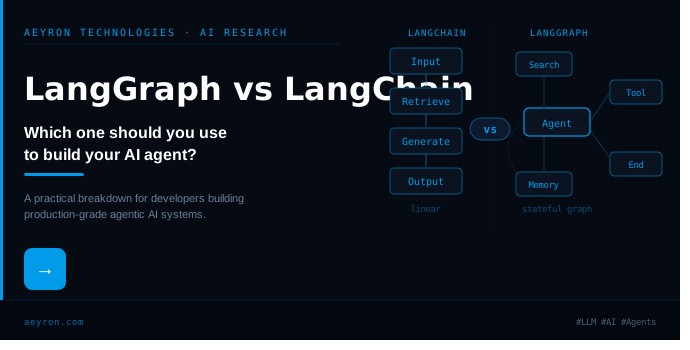
The framework is based upon a linear chain concept. You create an ordered list of operations and each operation accepts input from previous operations in order to produce some output.
This will work very well for many applications. A RAG pipeline would be an example of a linear chain, where it first searches for documents and then uses those results as input into a generation model. An example of a multi-turn chat-bot with memory is another example of a linear chain. Lastly, if you have a system that calls out to other systems to perform tasks and format responses, it can be viewed as a linear chain.
LangChain has an extensive integration library. Out of the box support includes dozens of different LLM provider libraries, various types of vector database libraries, document loader libraries and API libraries. If your AI application needs to interface with the outside world, there is likely pre-written integration code available via LangChain.
What LangGraph Actually Is ?
LangGraph, developed by the same developers of LangChain, is a library that represents AI workflows using a graph representation instead of representing these workflows as a linear sequence. The workflow represented within LangGraph is composed of a directed graph (nodes are individual computations steps, and edges determine which step the previous computation step is passed to). Unlike traditional sequential representations of workflows such as those used in LangChain, LangGraph provides users with complete control over loops, branches, and state. A typical LangChain workflow follows a single path from start to finish.
However, with LangGraph, an agent may execute in cycles, revisit prior states, choose to branch based on a condition or decision made during execution, and keep a continuous "state" object that remains up-to-date throughout the entire process. Once your agent needs to perform more than one action in order to accomplish its objective, then the ability to model complex workflows becomes critical. Most real world agents do not act in a purely linear fashion.
Instead they attempt to solve a problem, test if their solution was correct, make decisions about their next actions based upon the results of their test, and often will revert back to some earlier state and/or reattempt to find a solution through a new method. As such, LangGraph has been designed for this type of activity.
The Core Difference: Control Flow
LangGraph, developed by the same developers of LangChain, is a library that represents AI workflows using a graph representation instead of representing these workflows as a linear sequence. The workflow represented within LangGraph is composed of a directed graph (nodes are individual computations steps, and edges determine which step the previous computation step is passed to).
Unlike traditional sequential representations of workflows such as those used in LangChain, LangGraph provides users with complete control over loops, branches, and state. A typical LangChain workflow follows a single path from start to finish. However, with LangGraph, an agent may execute in cycles, revisit prior states, choose to branch based on a condition or decision made during execution, and keep a continuous "state" object that remains up-to-date throughout the entire process.
Once your agent needs to perform more than one action in order to accomplish its objective, then the ability to model complex workflows becomes critical. Most real world agents do not act in a purely linear fashion. Instead they attempt to solve a problem, test if their solution was correct, make decisions about their next actions based upon the results of their test, and often will revert back to some earlier state and/or reattempt to find a solution through a new method. As such, LangGraph has been designed for this type of activity.
When LangChain Is the Right Choice
LangChain fits best for applications which have an orderly (mostly) sequential process.
The most obvious example of these types of processes are RAG pipelines. In those cases you will search out appropriate documentation, insert those into a question/ prompt, and then get back a response. That is what I think of as a "chain." LangChain has done this type of thing easily, with a very small amount of boiler plate code, and provides good documentation for integrating LangChain with vector databases such as Pinecone, Weaviate, and Chroma.
Another example where LangChain does a great job is conversational AI with memory. If you need to create a chat bot which tracks the previous conversations, summarizes old responses, maintains state information about the last several responses or even the entire conversation (session), then LangChain's memory components provide you with that functionality without requiring you to develop the necessary logic yourself.
Therefore if your application falls within one of these categories, and you do not need to use other capabilities provided by LangGraph (or at least, not at this point), LangChain should be sufficient.
When LangGraph Is the Right Choice
LangGraph will become the best choice when your agent has to decide on something as part of its process of executing (rather than simply performing one task after the other), or if multi-step tool usage is required to accomplish the goal of an application.
Multi-tool usage by an agent typically triggers cycles. For example, the most frequent reason for needing a cycle is when the agent makes a search tool request, reads the results, determines it still doesn't have enough data, requests additional information using a second tool, evaluates whether all the combined data is sufficient, and finally produces an answer. Therefore, there is a need for a mechanism to maintain state over each step. LangGraph allows you to do so naturally.
Another good use case for LangGraph is Human-in-the-Loop Workflows. LangGraph provides support for pausing an executing application at a designated checkpoint and waiting for some type of user input prior to resuming. It is very difficult to create such functionality with a traditional chain-based workflow. However, it works well with a graph-based workflow in LangGraph.
Additionally, Error Handling and Retry Logic also perform much better in LangGraph. When an error occurs while calling a tool, the agent can branch to a Recovery Node, try a new method, and then continue processing through the original flow. To build this into LangChain requires workarounds. To build this into LangGraph, however, it is a built-in design pattern.
Finally, Multi-Agent Systems (MAS) are perhaps the greatest area where LangGraph separates itself from many simpler methodologies. MAS is composed of multiple specialized agents who collaborate and transfer tasks between each other. As stated earlier, each agent can be represented as a node. The Graph represents which path the workload will follow as it is transferred between nodes. Finally, the State Object carries the shared Context of the entire System.
They Work Together, Not Against Each Other
One thing worth being clear about: LangGraph is built on LangChain. It uses LangChain's model integrations, prompt templates, and tool abstractions. You don't choose one or the other in the sense of picking competing frameworks.
A practical production architecture often looks like this: LangChain handles the integrations and lower-level components, retrieval, tool definitions, model calls, and LangGraph handles the orchestration layer that controls how everything fits together and flows.
If you already have a LangChain application and you need to add agentic behavior, LangGraph is the natural upgrade path. You don't throw away what you've built. You add the orchestration layer on top.
Observability with LangSmith
Both LangChain and LangGraph integrate with LangSmith, LangChain's tracing and evaluation platform. For any non-trivial agent, this is worth setting up early.
LangSmith gives you a visual trace of every node execution, every model call, every tool invocation, and the state at each step. When an agent produces a wrong answer or gets stuck in an unexpected loop, LangSmith is what makes the debugging process tractable rather than a guessing game.
This applies more urgently to LangGraph applications. The cyclical, stateful nature of graph execution makes tracing especially valuable. Without visibility into what the agent decided at each step and why, debugging becomes genuinely painful.
A Practical Decision Framework
A simple way to think of this when choosing one at this point in time for your project would be to first determine how much your Agent needs to accomplish.
If the workflow that your Agent needs to complete is linear and predictable, then using LangChain Chaining will provide enough functionality to support your Agents workflow and will also allow for building out your solution more quickly than LangGraph. However, if the workflow is iterative (i.e., loops), dependent upon decisions made during the course of execution (conditional branching) by your Agent based on results generated by previous operations (intermediate results), requires Human Approval steps, is coordinated between multiple agents, or includes complex Error Recovery processes, then you should begin your solution design with LangGraph. The reason for beginning with LangGraph is that adding Graph Based Orchestration to an existing Chain Based Architecture is much more difficult than starting with the correct architecture from day one.
The Bottom Line
LangChain and LangGraph are two products solving problems in very different ways and at very different levels of complexity. LangChain is a full-featured application development framework based on LLMs, supporting both linear and stateless (retrieval) workflows as well as a wide variety of providers and tools. LangGraph is the graph-based workflow orchestration layer that is part of LangChain; it was built specifically for the type of complex AI systems that require statefulness, loops, and agent coordination.
If your AI system can be solved using a linear, single-pass approach with no looping or agent interactions then LangChain may be sufficient. However if you are developing a production-level AI agent that has to reason over time, loop through multiple steps, interact with other agents/tools etc. -- then LangGraph is what you will want to be working with
Aeyron Technologies
· 8 min read